Ads & competitors · 3 min read
How to Use the Meta Ad Library to Find Winning Ads
Every ad running on Facebook and Instagram is public — free, no login. Here’s how to search it, read every ad card, and spot the ones that are working.
What the Meta Ad Library is
It’s Meta’s public database of ads. In Meta’s words, it “contains all active ads that are shown across Meta technologies” — Facebook, Instagram, Messenger and the rest. Anyone can search it for any word, name or Page. You only need to log in to download your searches.
For finding winning funnels, it’s the single best free source there is: you see the exact ads competitors are paying for right now.
What it shows — and what it hides
What you see depends on where the ad runs. This is the part most guides skip:
| Ad type | What you see | Kept after it stops? |
|---|---|---|
| Regular ads (e.g. US-only) | The ad, the Page, and only the date it started running. No spend, no impressions, no reach, no targeting. | No — it disappears when it stops. |
| Ads delivered in the EU or UK | Plus total reach, reach by location, age and gender, and the targeting choices. EU ads also show who paid. | Yes — for 1 year after the last impression. |
| Social issue, election or political ads | Plus spend, reach and who funded them. | Yes — for 7 years. |
How to search it (3 steps)
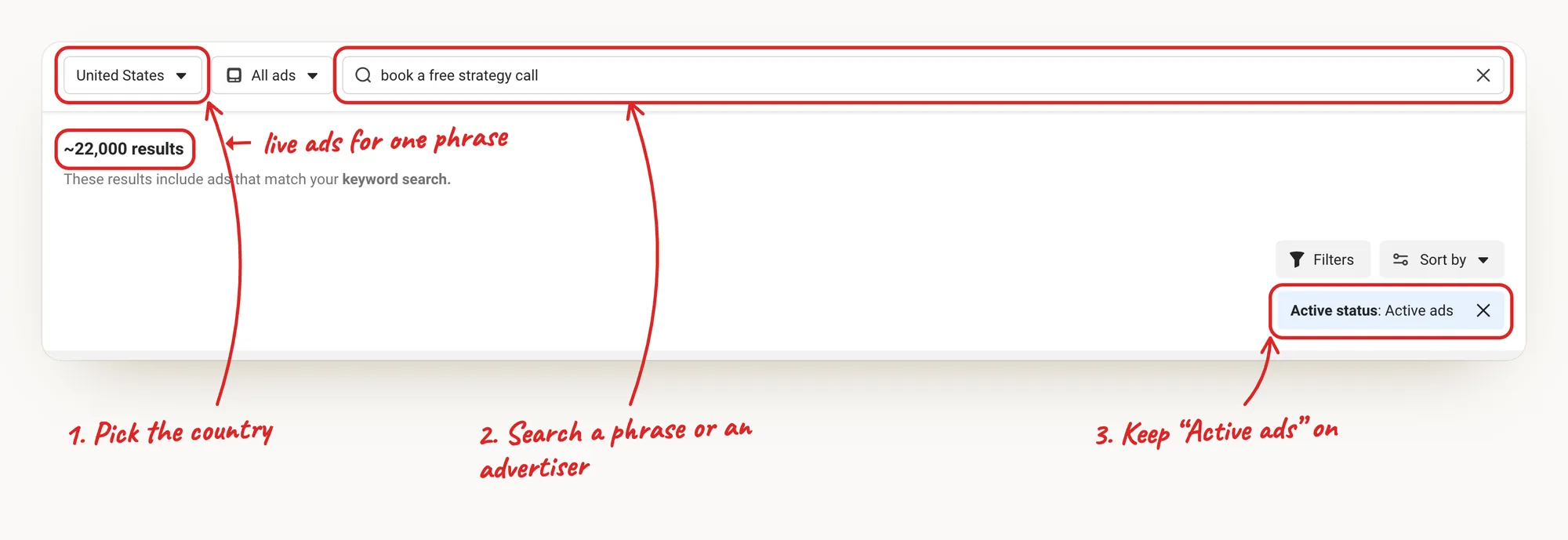
- Pick the country where your buyers are. Results change by country.
- Search a phrase or an advertiser. A Page name shows every ad that Page runs. A phrase finds every advertiser using it.
- Keep “Active ads” on. Old, stopped ads tell you nothing about what works today.
Tap the image to zoom in
How to read an ad card
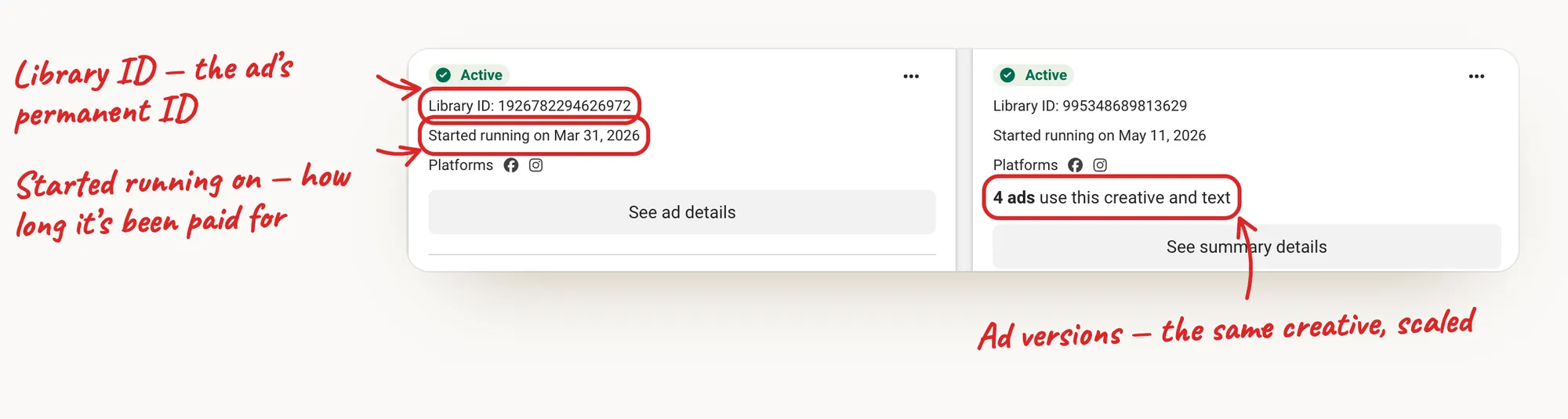
Every result is a card. Four lines matter:
- Started running on — how long the advertiser has been paying for it. The single most useful date in the Library.
- “N ads use this creative and text” — the same ad running as several versions. Advertisers multiply what works.
- Library ID — the ad’s permanent ID, handy to find it again.
- See ad details — the full ad, its versions and the link to the landing page.
Tap the image to zoom in
The EU/UK trick: real reach numbers
If an advertiser also runs the ad in Europe or the UK, switch the country to an EU country or the UK. For those ads Meta shows reach — how many people saw it, by age, gender and location. It’s the closest thing to a size signal the Library gives you.
Signals that an ad is working
No single signal proves an ad makes money. Together, they’re strong:
- It started months ago and is still active.
- It runs as several versions of the same creative.
- The advertiser keeps launching new ads to the same page.
We go deep on each one — and the false positives — in How to Tell If a Competitor’s Facebook Ad Is Profitable.
Follow the ad to the funnel
The ad is only half the story. The money is in what happens after the click:
- Open See ad details and click through to the landing page.
- Check the page has an ad pixel — see How to Check If a Website Is Running Paid Ads.
- Walk every step — opt-in, order form, upsell — as in How to Find and Analyze Your Competitors’ Sales Funnels.
Why you can’t find an ad
- It stopped running. Regular ads aren’t archived — once inactive, they’re gone.
- Wrong country. The Library filters by where the ad is shown.
- Different Page name. Many brands advertise from a person’s Page or a second Page. Search a phrase from the ad instead.
- Age-restricted ads (alcohol, for example) don’t show their creative to people who aren’t logged in.
Doing this for a whole niche — in minutes
Searching phrase by phrase, opening every card and every landing page takes hours per niche. Winning Funnels does it for you: it searches the Ad Library, opens every landing page, checks the pixels, and shows how long each ad has run and what the funnel likely makes.
Questions
Is the Meta Ad Library free?
Yes. It’s public — anyone can search it, without an account. Logging in is only needed to download searches.
Does the Meta Ad Library show all ads?
It shows all active ads running across Meta’s apps. Regular ads that stopped running aren’t kept; EU/UK ads are kept for a year and political ads for seven.
Can I see how much a competitor spends on an ad?
Not for regular commercial ads. Spend is shown only for ads about social issues, elections or politics.
How do I find a competitor’s landing page?
Open the ad’s “See ad details” and follow its link. Then check the page for ad pixels and walk the funnel step by step.
Sources
- Meta Business Help Center — About the Meta Ad Library (what each region shows)
- Meta Transparency Center — Ad Library tools
Checked on October 15, 2026. Platforms change their tools — if something looks different, the official pages above have the latest.
Keep reading
Skip the scrolling. Find the winners in your niche.
Type your niche — the AI searches the Ad Library and opens every funnel for you.